Overdrop - Weather & Widgets
overdrop.appWeather
4.21.73K Reviews
- Version
- 2.5.2
- Installs
- 1.00M
- Age Rating
- Everyone
Screenshots
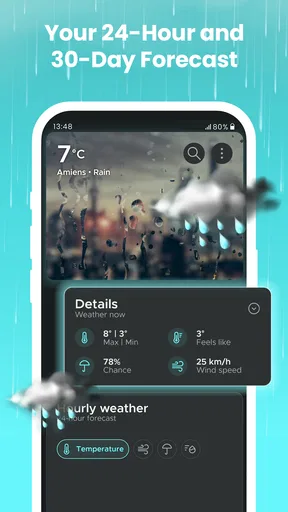
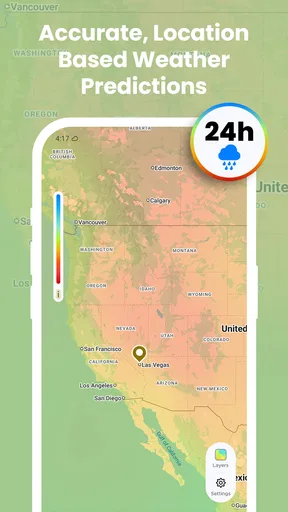
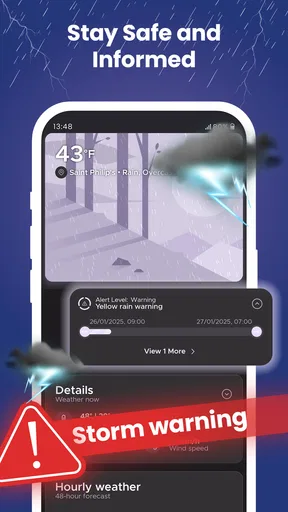
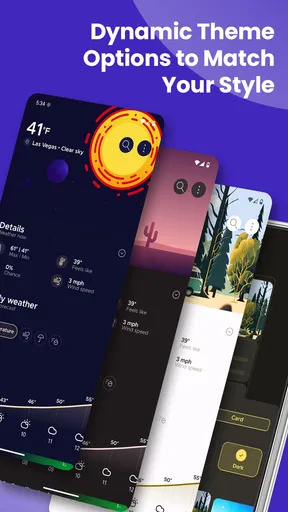
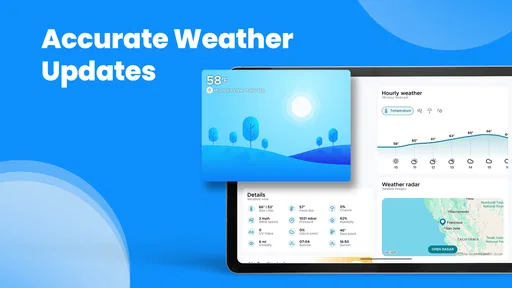
Our Review of Overdrop - Weather & Widgets
 Analysis by Appyee
On a busy morning, I want a weather app to answer a small but practical question quickly: should I take a coat, change my plans, or leave things as they are? Overdrop - Weather & Widgets is built around making that check easy, with a visual forecast and home-screen widgets that can keep useful details close by. Its first appeal is obvious, but a weather app earns its place over time only if it remains helpful without demanding constant attention.
A quick first-week impression
Overdrop is a free weather app from overdrop.app, and its current version is 2.4.0. The app is rated for Everyone and runs on Android 6.0 and later. I can see the attraction for someone who checks the forecast several times a day: the interface is designed to put a quick read and more detailed information within the same app, rather than making every check feel like a search through menus.
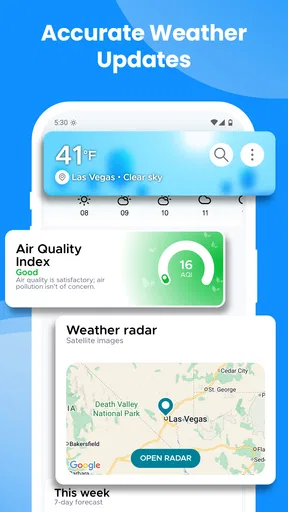
That convenience is most useful when a forecast affects a near-term decision. If I’m choosing between walking to an appointment and taking transit, I care more about the expected conditions around the time I leave than a broad summary for the whole day. An hourly view can help with that kind of planning, while a radar view is better suited to checking how precipitation is developing nearby. Neither replaces looking out the window, but together they give the forecast more practical context.
During the first few days, it is tempting to explore every presentation option and fill the home screen with weather information. I’d resist that urge. Pick one widget that answers the question you actually ask most often, then use the app normally for a week. That makes it easier to judge whether the extra glance saves time or simply adds another display to maintain.
What still matters after the novelty
For regular use, the strongest case is the combination of a glanceable home screen and details available when plans become uncertain. A widget can make a brief morning check easier, while opening the app gives more room to inspect the forecast. That division of labor is more compelling to me than customization on its own: a design choice has lasting value when it helps me get to a decision faster.
Think of a day with errands spread across town. I might check the conditions before leaving, notice a possible change later in the day, and decide whether to bring a light layer or move an outdoor stop earlier. For that workflow, I would compare the hourly outlook with the broader forecast rather than treating one icon as a promise. Weather predictions are guidance, not a guarantee, and a forecast that shifts over the day is a reason to check again before committing to a plan.
Overdrop has an average rating of 4.3 from around 20,000 ratings, with roughly 1,700 written reviews and over one million installs. Those figures suggest it has found an audience, but they do not tell me whether its forecasts will suit a particular location or routine. I’d judge it by whether the timing and presentation work for the places I actually go, not by popularity alone.
Keeping the app useful without fuss
Widgets are only helpful if they remain readable and relevant. I’d start with a compact option, place it where I naturally look, and avoid adding several widgets that repeat the same information. If a detailed layout feels crowded on a smaller screen, a simpler one may be the better daily choice even if it shows less at a glance.
The same restraint applies to notifications. Weather alerts can be valuable when severe conditions might affect travel or outdoor plans, but too many routine notices can make them easy to ignore. I’d keep only the alerts that would actually change what I do. A useful alert should prompt a decision; if it rarely does, adjusting it is part of keeping the app helpful rather than letting it become background noise.
Customization also has a maintenance side. A carefully matched widget or theme can make a phone feel more personal, but changing layouts repeatedly takes time and does not improve the forecast itself. I’d set up the screen once, then revisit it only when a genuine need changes—for example, when a clearer layout would make the information easier to read. That keeps the visual options in service of the habit instead of turning setup into the habit.
Where it fits among weather apps
Compared with a phone’s built-in weather app, Overdrop makes a stronger case for people who care about widget choice and a more tailored presentation. A built-in option may be preferable if all you need is a quick temperature check and you want to avoid setting up another app. On the other hand, someone who regularly checks radar or wants weather information arranged around their home screen may find Overdrop more convenient.
It also sits between a basic forecast tool and a dedicated weather service that people use for more specialized decisions. For everyday choices—clothing, a commute, a walk, or the timing of errands—the app’s mix of overview and detail can be enough. If a decision has serious safety consequences, I would not rely on a single app display alone; I’d pay attention to official local alerts and use the relevant local guidance. That is sensible caution, not a weakness unique to Overdrop.
The app is free to download, with in-app purchases ranging from $0.99 to $104.99 per item. I’d treat the free experience as the place to decide whether its layout and routine suit me before spending anything. A person who only needs the occasional forecast may have no reason to buy extras, while someone who values a more customized weather setup may want to examine the available options and make sure the purchase addresses a real need.
Who will get the most from it?
I’d recommend trying Overdrop if you check weather often, enjoy shaping your home screen, or want radar and forecast details available without switching between several tools. It is also a reasonable fit for someone who plans outdoor activities but wants a fast way to revisit the conditions as the day approaches. The app’s appeal is not just that it looks different; it is that a well-chosen widget can make a recurring check feel effortless.
I’d be less enthusiastic about it for someone who wants only a bare-bones temperature reading, dislikes customizing phone screens, or is already satisfied with a built-in weather app. If an extra widget or another set of notifications would feel like clutter, the simplest option may be the better one. Likewise, if you depend on forecasts for a specialized activity, compare the information Overdrop provides with the sources and detail that activity requires before making it your sole reference.
Intuitive Design Meets Functionality
First things first, let's talk about the design. Overdrop - Weather & Widgets boasts a sleek, modern interface that’s both visually appealing and incredibly user-friendly. The app is designed with a minimalist style, meaning you're not overwhelmed with information. Instead, everything is laid out in a way that's easy to digest, even if you're in a rush.
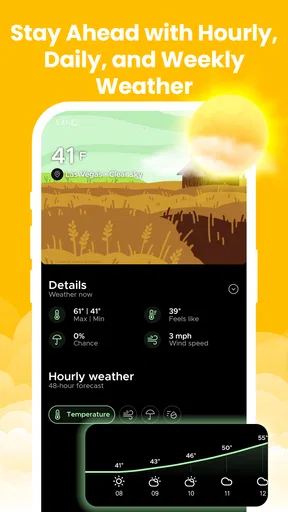
The main screen gives you a quick snapshot of the current weather, including temperature, precipitation chances, and wind speed. But that's just scratching the surface. Swipe around, and you'll find detailed forecasts, radar maps, and even air quality information. It's like a weather wonderland!
Widgets Galore
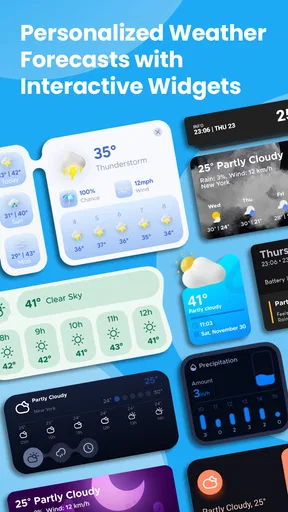
If you're like me and love having information at a glance, then you’re going to love the widgets. Overdrop offers a variety of widgets that you can customize to fit your aesthetic. Whether you prefer a simple clock and temperature widget or a more detailed weather forecast, there’s something for every taste.
The ability to customize these widgets is a game-changer. You can tweak the size, color, and even the transparency to match your home screen vibe. Plus, they update in real-time, so you always have the latest info.
Accurate Forecasts
Now, what's a weather app without accurate forecasts, right? Overdrop uses data from multiple sources, including Dark Sky and WeatherBit, which means you’re getting top-notch accuracy. I’ve compared its predictions with other apps, and honestly, Overdrop takes the cake.
The app provides hourly forecasts, which are perfect for planning your day. Whether you're scheduling a hike or just deciding when to take the dog out, these forecasts are spot on. Plus, you can check up to a week in advance, so planning your weekend getaway just got a whole lot easier.
Alerts and Notifications
One of my favorite features has to be the severe weather alerts. Overdrop sends you notifications about any upcoming weather changes that might affect your plans. This includes storm warnings, sudden temperature drops, or even heatwaves. It’s like having a little weather guardian watching over you.
You can customize these alerts to suit your needs, so you’re only notified about the things that matter to you. It’s all about making sure you’re prepared, no matter what Mother Nature throws your way.
Battery Efficiency
Let’s be real, no one likes an app that drains your battery. Fortunately, Overdrop is designed to be lightweight and efficient. It won’t hog your phone’s resources, ensuring that you still have enough juice for all your other daily tasks. This is a huge plus for anyone who’s constantly on the go.
Aesthetic Themes
If you’re into customization, you’re going to love the themes available in Overdrop. You can choose from light, dark, or even AMOLED themes, depending on your preference. It’s a small touch, but it allows the app to blend seamlessly with your device’s overall look.
Switching themes is super simple and can even help save a bit of battery life if you opt for the dark or AMOLED versions. It’s all about giving you options to make the app truly yours.
Whether it earns a lasting place
The wider appeal is reflected in its 4.3 average rating, but my own test for a weather app is more ordinary: does it help me make a decision without turning a quick check into a project? Overdrop has a good chance of becoming a steady part of someone’s routine when its widget is configured once, its alerts are selective, and its forecast is checked again when plans depend on changing conditions.
Its longevity depends on that balance. The range of widgets and themes invites experimentation, yet the most useful setup may be the one I stop noticing because it quietly answers a daily question. If I find myself opening the app only to adjust its appearance, or dismissing notices without reading them, that is a sign to simplify rather than keep tinkering. Weather apps are recurring tools, so small frictions matter more than a splashy first impression.
Overdrop is a weather app from overdrop.app, available free with optional in-app purchases, and its broad widget focus gives it a clearer identity than a plain forecast screen. I’d try it for a week with one widget and only the alerts I genuinely need. If that setup makes it easier to prepare for the day, it has earned its space; if the built-in forecast already does the job, there is no need to add another layer to the phone.
In conclusion, Overdrop - Weather & Widgets is more than just a weather app; it's your daily companion for planning and staying informed. With its combination of accurate forecasts, customizable widgets, and user-friendly design, it’s hard not to fall in love with it. So, if you're tired of being caught in the rain or missing out on sunny days, give Overdrop a try. You won’t be disappointed!
Verdict
Strengths of Overdrop - Weather & Widgets
- Beautiful and intuitive interface.
- Highly accurate weather forecasts.
- Customizable widgets for homescreen.
- Minimal battery consumption.
- Includes severe weather alerts.
Limitations of Overdrop - Weather & Widgets
- Limited free version features.
- Some widgets are locked behind paywall.
- Ads in free version can be intrusive.
- Occasional syncing issues reported.
- No radar feature available.
Similar Picks in This Category
View All
Weather - By Xiaomi
Xiaomi Inc.4.1

Weather & Radar Forecast
WetterOnline4.8

Weather
OneLouder Apps4.6

AccuWeather: Weather Radar
AccuWeather3.6

The Weather Channel - Radar
The Weather Channel4.6

1Weather Forecasts & Radar
OneLouder Apps4.3
Frequently Asked Questions
What features does Overdrop offer for weather forecasting?
Overdrop provides a comprehensive suite of weather forecasting tools, including real-time weather updates, detailed forecasts for up to a week, severe weather alerts, and radar maps. The app also includes customizable widgets for easy access to weather information directly from your home screen, making it a versatile choice for weather enthusiasts.
Is Overdrop free to use, or does it require a subscription?
Overdrop offers both a free version and a premium subscription. The free version includes basic features such as daily forecasts and widgets. However, to access advanced features like extended forecasts, additional widget designs, and ad-free experience, users can opt for a premium subscription, which is available via in-app purchase.
How accurate is Overdrop's weather data?
Overdrop sources its weather data from leading providers like Dark Sky, WeatherBit, and OpenWeatherMap, ensuring high accuracy and reliability. Users can choose their preferred weather provider within the app, which allows for a tailored experience. This variety of data sources helps enhance the precision of forecasts and alerts.
What customization options are available for Overdrop widgets?
Overdrop offers a wide range of customization options for its widgets. Users can choose from various widget styles, sizes, and color themes to match their home screen aesthetic. Additionally, widgets can be configured to display different types of weather data, such as temperature, humidity, wind speed, and more, providing a personalized weather experience.
Does Overdrop support international weather data?
Yes, Overdrop supports international weather data, making it suitable for users around the globe. The app provides weather information for multiple locations worldwide, and users can easily switch between different cities or regions. This global support ensures that travelers and international users can rely on accurate weather updates no matter where they are.
